


Smart Pet Camera vs Security Camera: Which Suits Your Dog
Table of Contents
- Smart Pet Camera vs Security Camera: Key Differences
- Essential Features for Monitoring Your Dog
- Best Interactive Dog Camera with Treat Dispenser
- Privacy and Data Security for Home Cameras
- How to Choose a Camera for Separation Anxiety
- Cloud Storage vs Local Storage: What You Need
- Long-Term Costs: Subscriptions and Hidden Fees
- Conclusion
- Frequently Asked Questions
Last Updated: September 3, 2026
Smart Pet Camera vs Security Camera: Key Differences
A smart pet camera and a home security camera serve fundamentally different purposes. The smart pet camera is purpose-built to monitor your dog's behaviour, enable two-way communication, and often includes interactive features like treat dispensers. A security camera prioritises perimeter monitoring, motion detection across your entire home, and recording for evidence purposes.
Pet cameras typically offer wider fields of view to capture your dog's full activity area, lower-light infrared sensors tuned for indoor pet monitoring, and app interfaces designed around pet-specific alerts like barking detection. Security cameras focus on sharp identification of people and objects, longer recording retention, and integration with alarm systems.
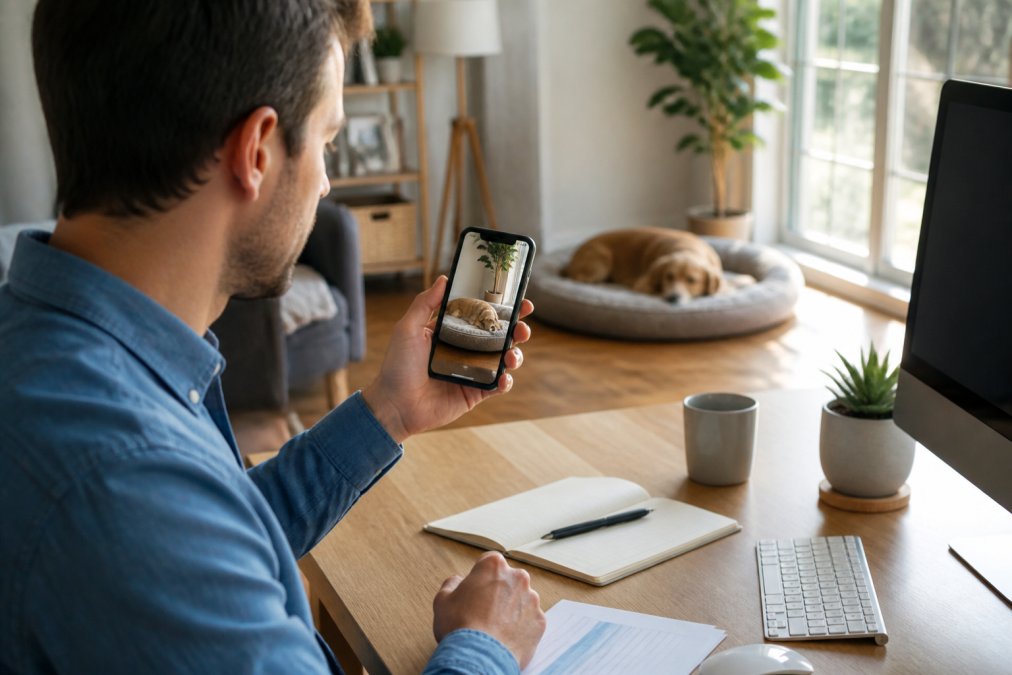
Pet cameras typically cost less upfront because they're designed for single-room indoor use. Security cameras often cost more because they're built for outdoor durability and professional-grade features. However, subscription costs can flip this equation. Many pet cameras include cloud storage and two-way audio in their base subscription, whilst some security systems charge separately for each feature.
Essential Features for Monitoring Your Dog
When choosing a camera specifically for monitoring your dog, certain features become non-negotiable. Night vision matters because dogs sleep during the day and you'll want to check on them in dim lighting. Motion detection should be sensitive enough to catch your dog moving around but not trigger constantly from shadows or light changes. Real-time monitoring with push notifications means you get alerted the moment your dog starts barking or moving.
Two-way audio transforms a pet camera from a surveillance tool into an interactive device. You can hear your dog and speak to them, providing comfort when they're alone and helping you address problem behaviours in the moment. Field of view is critical; most pet cameras offer 110-160 degrees, allowing you to see most of a single room.
Video resolution affects how clearly you see your dog's behaviour. Full HD (1080p) is the minimum acceptable standard for pet monitoring (aafco.org). It lets you spot signs of distress, injury, or destructive behaviour clearly enough to act. Frame rate also matters; 30fps provides smooth video, whilst lower frame rates create jittery playback that makes it difficult to assess your dog's movements accurately.
Sound detection is an underrated feature. Some pet cameras can distinguish barking from other household sounds, sending you targeted alerts when your dog barks rather than every time a car passes outside. Local storage options (microSD card slots) provide backup if your internet connection drops, ensuring you don't lose video footage during outages.
Best Interactive Dog Camera with Treat Dispenser
An interactive dog camera with a built-in treat dispenser transforms monitoring into engagement. Instead of watching passively, you can reward your dog for calm behaviour, reinforce training commands, or provide mental stimulation when they're alone.
Quality matters enormously. A cheap dispenser jams regularly, frustrating both you and your dog. The mechanism should be smooth enough to dispense treats reliably every time. Treat size compatibility is crucial; some dispensers only work with small pellets, whilst others handle larger treats or kibble.
The best models offer app-controlled dispensing with instant feedback. You tap a button in the app, see the treat drop in real-time through the camera, and watch your dog react. This immediate feedback loop lets you reinforce positive behaviour as it happens. Some cameras allow you to set up automated dispensing schedules to keep your dog occupied during your work day.
Consider the treat capacity. A dispenser that holds only 10 treats requires constant refilling if your dog is home alone for 8 hours. Larger hoppers (30-50 treat capacity) reduce refilling frequency. Look for models with removable, dishwasher-safe hoppers for easy cleaning.
The downside is ongoing cost. You're buying treats specifically for the camera, which adds up over months. Some dog owners find their dogs become obsessed with the camera, barking or jumping at it constantly because they expect treats. This behaviour can actually worsen separation anxiety rather than improve it. Use the dispenser strategically, rewarding calm behaviour, not attention-seeking barking.
Privacy and Data Security for Home Cameras
Any internet-connected camera is potentially vulnerable to hacking. Your pet camera sits on your home network alongside your laptop, phone, and personal files. A compromised camera becomes a backdoor into your entire network.
Encryption matters fundamentally. Look for cameras that use end-to-end encryption for video streams, meaning only you and the camera can see the footage. Check whether the manufacturer stores your footage on their servers and for how long. Some companies delete cloud footage after 24 hours; others keep it indefinitely unless you manually delete it.
Two-factor authentication should be mandatory for your camera account. Firmware updates are critical; manufacturers release security patches regularly, and cameras that don't update automatically are vulnerable to known exploits. Check whether your chosen camera receives regular updates and for how long the manufacturer supports older models.
Privacy settings matter. Some cameras offer the ability to disable recording during certain hours or create privacy zones where recording is blocked. Check your local regulations; recording audio without consent is illegal in many jurisdictions.
Read the manufacturer's privacy policy carefully. Some companies sell anonymised usage data to advertisers or share data with third parties. If the policy is unclear or overly broad, consider a different camera.
How to Choose a Camera for Separation Anxiety
Choosing the right camera for a dog with separation anxiety requires understanding what actually helps. A standard security camera won't help because it provides no way to interact with your dog. A pet camera with two-way audio is essential; your voice is a proven comfort tool for anxious dogs.
Look for cameras with latency under 2 seconds (peer-reviewed research). Latency is the delay between what's happening in your home and what you see on your phone. High latency (5+ seconds) makes two-way communication feel delayed and unnatural, reducing its calming effect.
Barking alerts are valuable for separation anxiety monitoring. When your dog starts barking, you get an instant notification, allowing you to intervene with two-way audio before the anxiety escalates. Some cameras can distinguish between alert barking and stress barking, helping you understand what's triggering your dog's anxiety.
Mount the camera where you can see your dog's entire body and the surrounding area, but position it so your dog can see the camera lens when you speak to them. This creates a sense of connection. Avoid positioning the camera directly above your dog's bed, which can feel intrusive and increase stress.
Consider redundancy. If your internet drops, does the camera continue recording locally? If your phone battery dies, can you access the camera from a computer? Some cameras offer web access in addition to mobile apps, providing backup access options.
Start with short absences. Test the camera during 30-minute trips to see how your dog responds to hearing your voice through the speaker. Gradually increase absence duration as your dog adjusts. The camera is a tool to reduce anxiety, not a replacement for addressing the underlying separation anxiety through training and gradual desensitisation.
Cloud Storage vs Local Storage: What You Need
Cloud storage uploads your footage to the manufacturer's servers, accessible from anywhere on any device. Local storage saves footage to a microSD card inside your home. Each approach has distinct advantages and limitations.
Cloud storage offers convenience and accessibility. You can review footage from anywhere without needing to access your home network. Most pet cameras include at least 24 hours of cloud storage free; premium subscriptions extend this to 30 days or more. The downside is ongoing subscription costs and dependency on the manufacturer's servers.
Local storage requires a microSD card (typically 32GB to 256GB). A 128GB card stores roughly 7-14 days of continuous HD video, depending on frame rate and compression (kingston.com). Local storage is one-time cost with no ongoing subscription, and footage remains yours even if the manufacturer discontinues the product. The limitation is accessibility; you can only review local footage when connected to your home network via VPN.
The hybrid approach combines both. You keep 24 hours of cloud backup for quick access and emergency review, whilst local storage provides long-term retention. If your internet connection drops, local storage continues recording without interruption. If your microSD card fails, your cloud backup protects recent footage.
Bandwidth usage is a practical consideration. Continuous video upload to cloud storage consumes significant internet bandwidth. If you have limited broadband (under 10Mbps upload speed), cloud storage may cause noticeable slowdowns for other devices. Local storage uses zero bandwidth beyond the initial setup.
Long-Term Costs: Subscriptions and Hidden Fees
The upfront camera price is only the beginning. Monthly subscriptions, cloud storage fees, and feature unlocks create ongoing costs that often exceed the initial purchase.
Cloud storage subscriptions vary widely. Basic plans (7-30 days of storage) typically cost £3-8 monthly. Premium plans (60-90 days of storage) cost £8-15 monthly. Some manufacturers offer annual discounts, reducing the monthly rate by 15-25%. A £5 monthly subscription equals £60 yearly, which quickly adds up across multiple cameras.
Feature unlocks represent hidden costs. Some cameras sell advanced features separately: person detection, pet detection, sound detection. A camera advertised as "affordable" might require three separate subscriptions to match a competitor's included features. Read the fine print carefully and add up all required subscriptions to get the true monthly cost.
Two-way audio sometimes requires a separate subscription tier. Treat dispenser operation might require premium membership. Advanced motion detection might be locked behind paid plans. Clarify these requirements before purchasing.
Local storage avoids subscription costs but requires occasional microSD card replacement. A 128GB card costs £15-30 and lasts roughly 2-3 years. This is a one-time cost worth factoring into long-term budgeting.
Calculate the true cost of ownership over 3-5 years. A £150 camera with a £5 monthly subscription costs £330-480 total over 5 years, plus any microSD cards. A £300 camera with no subscription costs £300 plus microSD cards. This calculation should influence your choice.
Conclusion
The choice between a smart pet camera and a security camera depends entirely on what you're trying to accomplish. A security camera excels at monitoring entry points and providing evidence if something goes wrong. A smart pet camera excels at monitoring your dog's behaviour and enabling interaction through two-way audio.
For most dog owners, a dedicated pet camera with two-way audio, motion detection, and night vision solves the separation anxiety problem that security cameras cannot address. The interactive features, especially two-way audio and treat dispensers, transform the camera from a passive monitoring tool into an engagement device that actually reduces anxiety.
At Doggo Shop, we recommend starting with a quality pet camera if your primary concern is your dog's wellbeing whilst you're away. Add a security camera only if you also need broader home monitoring. Many dog owners benefit from both, using the pet camera for daily separation anxiety management and the security camera for overall home protection.
Frequently Asked Questions
What is the best camera for watching pets at home?
The best camera depends on your needs. A smart pet camera excels at two-way audio, treat dispensers, and motion detection tailored to pet behaviour. A home security camera offers wider field of view and stronger night vision. For dogs with separation anxiety, choose a pet camera with real-time monitoring, sound detection for barking alerts, and two-way audio so you can speak to your dog. Look for models with reliable Wi-Fi connectivity and minimal latency to ensure consistent performance.
Is a pet camera a good idea for anxious dogs?
Yes, pet cameras can help manage separation anxiety. Two-way audio lets you reassure your dog remotely, while smart alerts notify you of excessive barking or destructive activity. Some models include treat dispensers for positive reinforcement. However, cameras alone won't solve anxiety, pair monitoring with exercise, training, and gradual desensitisation. Activity logs help you identify triggers and track progress over time. Real-time monitoring also gives you peace of mind and helps you respond quickly if your dog is distressed.
What are the privacy implications of using indoor cameras?
Indoor cameras raise privacy concerns for both you and visitors. Ensure your device uses encryption for all data transmission and storage. Check the manufacturer's privacy policy, some companies retain footage longer than necessary or share data with third parties. Use two-factor authentication to protect your account. Be transparent with household members and guests about monitoring. Consider local data storage options to keep footage off cloud servers. Review firmware updates regularly to patch security vulnerabilities and protect against unauthorised access.
Do I need a subscription for pet camera cloud storage?
Most pet cameras offer free local storage or limited free cloud storage, but subscriptions unlock extended recording, activity logs, and advanced alerts. Subscription costs vary widely depending on features and retention periods. Local storage options reduce ongoing costs but require manual backup. Compare long-term expenses: a cheaper camera with mandatory cloud subscription may cost more over three years than a pricier model with optional local storage. Evaluate your needs, if you only check footage occasionally, free options may suffice; frequent reviewers benefit from affordable subscription tiers.
Ready to support your dog's wellbeing with the right monitoring solution? Explore Doggo Shop's curated selection of interactive pet cameras and smart devices designed to keep your dog happy and engaged whilst you're away. Every purchase supports rescue dogs in need worldwide, shop now and make a difference.
This article was written using GrandRanker


Leave a comment