


How Long Does Dog GPS Battery Last? A 2026 Guide
Table of Contents
- How Long Does Dog GPS Battery Last? The Honest Answer
- Factors Affecting Dog GPS Battery Life
- Dog GPS Tracker Power Saving Modes Explained
- How to Charge a Dog GPS Collar Correctly
- How to Make Your Dog GPS Battery Last Longer
- Choosing a Tracker With Battery Life That Fits Your Dog
- Frequently Asked Questions
Last Updated: September 10, 2026
How Long Does Dog GPS Battery Last? The Honest Answer
A dog GPS battery typically lasts between 5 and 14 days on a single charge, depending on the tracker model, how often it reports location, and mobile signal strength where your dog spends its time (petfinder.com). Most owners get closer to the lower end than the marketing promise suggests.
That gap between the box and reality is the most common frustration we hear about: a tracker advertised as "30 days standby" can drop to five days once live tracking, geofencing, and weak rural signal pull on the same cell. This guide breaks down what drains a dog GPS battery, how charging affects its lifespan, and how to squeeze more days out of every charge.
Factors Affecting Dog GPS Battery Life
Battery life is not a fixed number, it is four variables working against each other every minute the collar is on.
The biggest drains are signal strength, update frequency, temperature, and network searching. A tracker in strong urban signal reporting every ten minutes will outlast the same unit in a rural area reporting every thirty seconds. Knowing which factors apply to your dog predicts real-world battery life better than the spec sheet.
Signal Strength and Rural Coverage
Weak mobile coverage is the silent battery killer. When a tracker cannot find a stable signal, it boosts transmission power and retries constantly, cutting battery life dramatically versus the same device in a strong-signal area.
In remote countryside, expect shorter battery life than a neighbour in a town centre using the identical collar. No setting fully solves this, plan charging around your routine, not the advertised figure.
Update Frequency and Live Tracking
Live tracking is the most power-hungry feature on any dog GPS tracker. Reporting every 30 seconds instead of every 10 minutes drains the battery several times faster, because each position fix wakes the GPS chip, mobile radio, and processor at once (gps.gov).
For everyday use, a longer update interval is plenty. Save live tracking for when your dog has actually gone missing.
Dog GPS Tracker Power Saving Modes Explained
Power saving modes buy extra days, and most owners never switch them on. They reduce reporting frequency, dim indicator lights, and pause non-essential features when your dog is safely at home. The trade-off: the more you save, the less real-time information you get. Match the mode to the situation rather than leaving one setting on permanently.
Geofence Alerts and Sleep Mode
A geofence creates a virtual boundary around your home or garden. While your dog stays inside it, the tracker drops into a low-power sleep state and only wakes when the boundary is crossed. Sleep mode is the most effective power-saving feature available. A common mistake is leaving live tracking running indoors, draining the battery for no benefit. Set a geofence and let the collar rest.
Age-Specific Power Settings: Puppy, Adult and Senior
Most guides treat every dog as the same battery load. In practice, age changes which power settings make sense, because it changes how far and how unpredictably your dog roams.
Puppies (under 12 months). A puppy's world is small and supervised, so you rarely need live tracking. Set a long update interval and keep sleep mode on indoors. The exception is teething, when a puppy may chew the collar; check the housing and charging contacts weekly, because a damaged contact causes partial charges and a falsely short battery life. Puppies also sleep far more than adults, so a geofence around the house and garden captures most of the day in low-power mode.
Adult dogs (1-7 years). This group needs balance. A healthy adult with reliable recall can run a moderate interval with the geofence active, switching to live tracking only for off-lead walks in unfamiliar ground. If your adult dog is an escape artist, accept shorter battery life and charge on a fixed schedule rather than chasing a standby figure.
Senior dogs (8+ years). Older dogs often move less but wander more unpredictably if hearing, sight or cognition declines. A senior with canine cognitive dysfunction may pace at night or slip out of a gate they have used for years. Keep a moderate interval running overnight rather than relying on sleep mode, and accept charging more often: a disoriented senior a street away is far harder to find than a fit adult, so the extra reporting does real work. Pair this with a lightweight collar, since heavy units sit badly on thinner senior necks.
Multi-Pet Households and Battery Drain
If you track more than one animal, battery life stops being a single-device question. Two patterns matter.
First, shared charging logistics. Two or three collars competing for one cable means at least one device is always part-charged, and part-charged lithium cells age faster than properly cycled cells. Rotate charging on a written schedule, collar A Monday and Thursday, collar B Tuesday and Friday, so each unit gets a full, uninterrupted charge.
Second, cross-device interference and false geofence wakes. In a multi-pet home, a geofence around the house can be triggered repeatedly by a cat or second dog moving between rooms, waking the tracker far more often than in a single-pet household. If your app allows it, set the geofence at the property boundary rather than the house, and use per-device sleep schedules so one animal's movement does not keep another collar awake. Where a cat and dog share a home, the cat's indoor movement is the usual culprit behind a dog collar that drains overnight.

Choosing the Right Mode for the Moment
Rather than picking one mode and leaving it, think in three states: at home (long interval, sleep mode on, geofence active), routine walk (moderate interval, geofence active), and missing or off-lead in unfamiliar ground (live tracking, short interval, accept the drain). Switching between these states manually or via app schedules beats any fixed setting, keeping the battery doing useful work instead of reporting a sleeping dog every thirty seconds.
How to Charge a Dog GPS Collar Correctly
Charging a dog GPS collar correctly means using the supplied cable, charging before the battery fully empties, and removing the collar at 100%. These three habits protect long-term capacity.
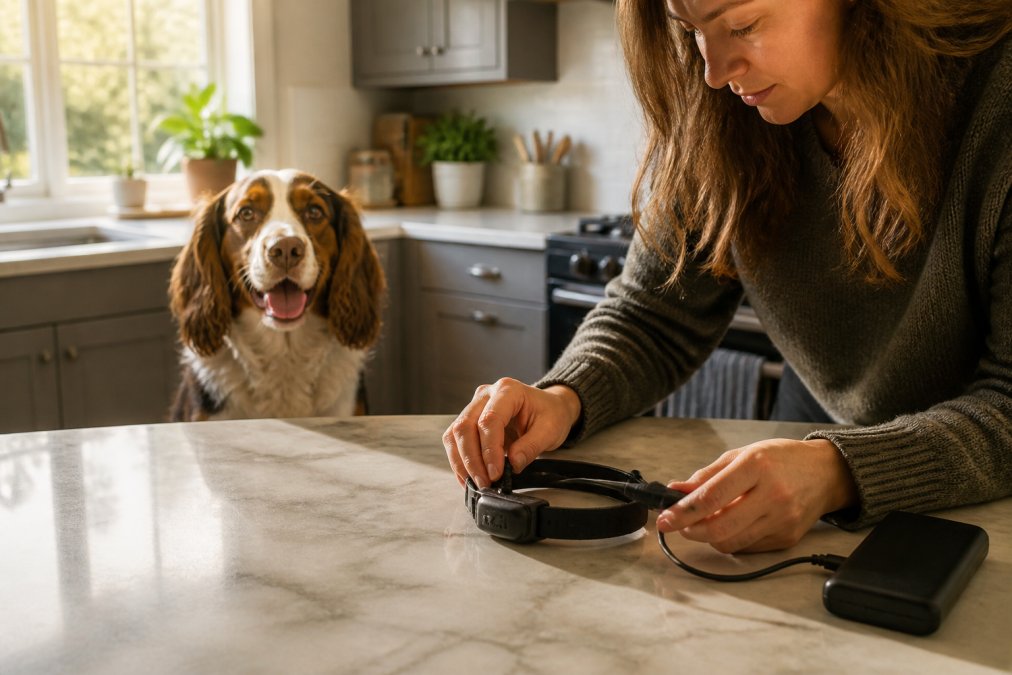
Most trackers use a magnetic or clip-on charging dock rather than a standard port, because dogs are hard on exposed connectors. Check the contacts are clean and dry before connecting, mud and moisture are the usual cause of a collar that refuses to charge.
Step-by-Step Charging Routine
- Remove the collar from your dog and wipe the charging contacts with a dry cloth.
- Plug the supplied cable into a standard USB adapter, not a fast-charge brick unless the manufacturer approves it.
- Connect the tracker and check the indicator light confirms charging has started.
- Leave it until the light signals a full charge, usually a few hours.
- Unplug promptly and refit the collar, checking the fit is snug but not tight.
Charging overnight is fine for most models, but avoid leaving a fully charged collar plugged in for days. Heat shortens battery longevity, and a tracker left charging in a warm room ages faster.
How to Make Your Dog GPS Battery Last Longer
Getting more days from each charge means reducing unnecessary work: every position fix, signal search, and indicator flash costs power. The list below ties each habit to your dog's age and the number of animals in your home, two variables most guides ignore.
Universal Habits That Always Help
- Increase the update interval when your dog is at home
- Enable sleep mode or a geofence for indoor hours
- Turn off LED indicators during the day
- Keep the charging contacts clean so the battery charges fully
- Store the collar indoors in cold weather, since low temperatures reduce usable capacity
A common mistake is assuming shorter battery life means a faulty device. Usually the settings are working harder than they need to. Adjust the update frequency first, and you will often double the time between charges without losing real usefulness.
Age-Specific Adjustments
Puppies. Reduce reporting during the many hours a puppy sleeps, and inspect the collar housing weekly for chew damage. A chewed or swollen housing stops the charging contacts seating properly, which looks like a failing battery but is really a charging fault. Puppies are walked on short, familiar routes, so a long interval costs nothing in real coverage.
Adult dogs. Match the interval to the walk, not the day. A moderate interval with a geofence covers most adults; switch to live tracking only when your dog is off-lead somewhere new. If your adult dog is an escape risk, stop stretching the battery and build a charging routine around their behaviour, for example, charge every second evening after the last walk.
Senior dogs. Prioritise overnight reporting over maximum battery life. A senior with declining sight, hearing or cognition is most likely to become disoriented close to home, exactly when a sleeping tracker is least useful. Accept more frequent charging, and choose a lighter collar so the device stays on. If your senior is on medication affecting thirst or urination, expect more night-time movement and more geofence wakes.
Multi-Pet Household Adjustments
- Rotate charging on a schedule. With two or more collars, a written rotation prevents any single device from living in a permanent state of partial charge, which shortens cell life.
- Set geofences at the property boundary, not the house. Indoor movement from a cat or a second dog can wake a dog's tracker repeatedly if the fence is drawn around the building.
- Use per-device sleep schedules. Where the app allows it, stagger sleep windows so one animal's activity does not keep another collar awake.
- Watch for 'collar stealing'. In playful multi-dog homes, one dog may chew or drag another's collar. A damaged antenna or housing increases transmission power draw and shortens battery life, so check each unit for bite marks when rotating them onto charge.
Sensory-Friendly Adjustments
Some dogs are sensitive to the collar itself, and a dog constantly trying to remove or scratch at a tracker will damage it and shorten its life. Two fixes:
- Choose a fabric or housing that does not crinkle. Crinkly or stiff materials irritate a dog's neck and lead to scratching that loosens the charging contacts.
- Manage static in dry indoor air. In heated winter homes, synthetic collars build static that makes a sensitive dog reluctant to wear the device. A natural-fibre cover or a wipe with a barely damp cloth reduces the build-up.
A collar your dog tolerates is a collar that stays charged and stays on. Comfort and battery life are more connected than they first appear.
A Simple Weekly Routine
Pick one evening a week to check every collar: wipe the contacts, confirm each device reached a full charge, inspect the housing for chew or scratch damage, and review whether your update intervals still match your dog's routine. Ten minutes a week prevents the two most common causes of 'short' battery life, partial charges and damaged contacts, and scales from a single puppy to a multi-dog, multi-cat household.
Choosing a Tracker With Battery Life That Fits Your Dog
The right tracker is the one whose battery matches your routine, not the biggest number on the box. A dog walked twice a day in town needs far less battery than a working dog covering miles of moorland.
Look for adjustable update intervals and a genuine sleep mode, because those two features decide real-world battery life more than the advertised figure. To pair tracking with everyday safety, the AirTag Dog Collar - LED Safety Tracker Holder for Pets at £24.99 holds an AirTag securely and adds LED visibility for evening walks, letting you choose a setup that suits your dog rather than one fixed package.
| Tracker Priority | Best Setting | Typical Effect on Battery |
|---|---|---|
| Everyday home use | Long update interval, sleep mode on | Longest life between charges |
| Regular walks | Moderate interval, geofence active | Balanced life and coverage |
| Escape-prone dogs | Live tracking, short interval | Shortest life, charge often |
| Rural or remote walks | Moderate interval, expect signal drain | Reduced by weak coverage |
Every order supports rescue dogs and cats in need worldwide.
Frequently Asked Questions
How often do I need to charge my dog's GPS tracker?
Most dog GPS trackers need charging every 2 to 7 days, depending on the model and how often you use live tracking. A tracker that pings location every few minutes will drain faster than one set to update hourly. Check your device's battery indicator daily during the first week so you learn its real-world pattern before relying on it for off-lead walks.
Does GPS tracking drain a dog collar battery quickly?
Live GPS tracking is the single biggest drain on a dog GPS battery. Constant location updates, mobile signal searches and Bluetooth syncing all pull power at once. Switching to a power saving mode that updates less frequently can stretch battery life from a single day to over a week. Use live tracking only when your dog is actually loose or missing.
What factors reduce the battery life of a dog GPS tracker?
Poor mobile signal, cold weather, frequent live tracking, weak Wi-Fi or Bluetooth connections and an ageing battery all shorten runtime. Cold temperatures in particular slow the chemical reaction inside lithium batteries, so winter walks can cut battery life noticeably. Keeping the device warm before a walk and charging it indoors helps.
How can I extend the battery life of my dog's GPS device?
Set the update interval to 15 or 30 minutes when your dog is at home, enable geofence alerts instead of constant tracking, and switch off LED lights during daylight. Charge the collar before it hits zero rather than letting it fully drain, and store it at room temperature. These habits can add several days between charges.
Battery life is never the number on the box; it is the number your settings and your dog's routine produce. Choose a tracker with adjustable intervals and a real sleep mode, charge it properly, and you will rarely be caught with a flat collar. Doggo Shop offers premium tracking and safety gear, from the LED AirTag collar to durable everyday essentials, with 10% of every order donated to rescue dogs in need. Get started with Doggo Shop and keep your dog safe on every walk.


Leave a comment